Category Archives: IPhone
WWDC Coverage Via Mashable.Com. What Just Happened?
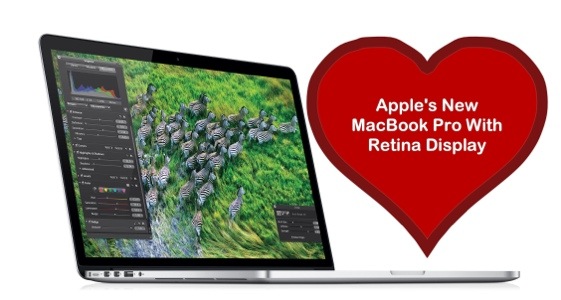
First of all, I would like to thank the incredible team at Mashable.Com for today’s outstanding live coverage of the WWDC 2012.
All the information and pictures you see in this article are attributed to Mashable.Com.
However, I would urge you to head on over to Mashable’s site for a more comprehensive look at the amazing technological advances awaiting us via Apple in the coming months.
This is truly the stuff of magic and dreams and, Steve Jobs, thank you for making this superior level of innovation possible in our lives.
Tim Cook and his team assembled a great presentation today, June 11th 2012.
Here is how it went down:
New Feature Of Photo Stream: Catching Technologically-Challenged Criminals.

I wonder if the late Steve Jobs and/or the team at Apple had any idea that some people’s technologically-challenged bent would come back to haunt them via ICloud and one of its most frequented services, Photo Stream?
According to Tuaw.Com, a guy who works on a Disney cruise ship stole someone’s IPhone and then proceeded to take his own pictures.
But the fun is just beginning. The original owner, Katy McCaffrey, started to see these same pictures appear on her Photo Stream album located on her computer and, surprisingly enough, on her Facebook page.
Yes, the culprit didn’t disable the Photo Stream option on the phone nor did he realize that uploading these pictures to Facebook would automatically access the original owner’s Facebook page.
He even named the page “Stolen IPhone Adventures”. The captions, written by owner, Katy McCaffrey, are just hilarious.
I think there should be a rule out there: no stealing iDevices unless you sign up for OneToOne training at the Apple Store.
This is the best story ever! It’s my feel good story going into the weekend. Needless to say, this person is no longer working for Disney. But, you already knew that, didn’t you?
The Type A – pple Approach To Detail. Apple’s Obsession With Perfection
This little Monday morning tidbit breaks me up!
I guess excellence really is in the details. And Apple -thanks to Steve Jobs – has proven time and again that this motto is firmly embedded in the work ethic of their employees.
From their meticulous attention to packaging and design, to their life-changing products and their compelling presentations and events, Apple has relentlessly taken a Type A approach to the manner in which their products are unveiled to and viewed by the consumers.
Now, a new tidbit has surfaced thanks to RedmondPie.Com, addressing the mother of all of Apple’s penchant for detail, perfection and precision.
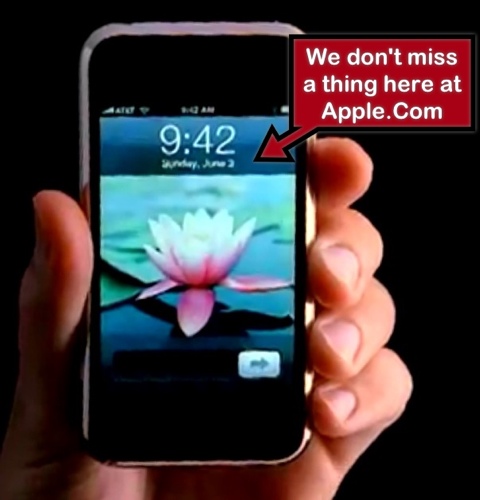
According to the article, there is a valid reason why the IPhone’s time is always set to 9:42 in Apple’s advertisements. And, if you are a fellow Type A, you’re going to love this!
Here is an excerpt from RedmondPie.Com’s article:
A bit of Google-fu tells us that Apple VP Scott Forstall has also weighed in on the story, and we much prefer his take on things. While the story does fit with Borchers to some extent, Forstall says that the 9:42 reference comes from Apple wanting the iPhone’s image to pop up on the big screen at around the 40-minute mark of Apple events. Apple eventually plumped for 9:42, so that the time on the image would match, as near as possible, the actual time when the latest handset is shown off.
“We design the (product launch) keynotes so that the big reveal of the product happens around 40 minutes into the presentation. When the big image of the product appears on screen, we want the time shown to be close to the actual time on the audience’s watches. But we know we won’t hit 40 minutes exactly.”
The story might also explain why the iPad tends to have a time of 9:41 in press images, with a similar story being true. While the times might not line up exactly during the keynotes at which new iPhones and iPads are announced, it tends to be fairly close at least.
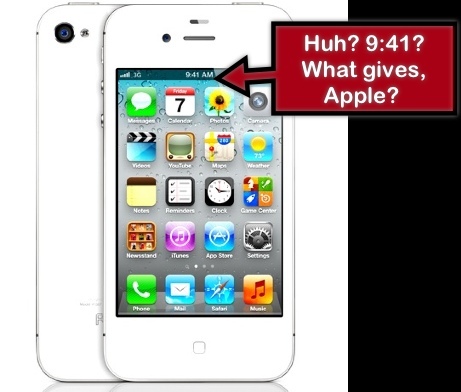
However, on Apple’s IPhone page, the IPhone is set to 9:41. Very perplexing, but close enough.
Is that jaw-dropper or no? Who thinks up this stuff? Pretty incredible!
Creating Memorable, Frame-Worthy Photos On The IPad Or IPhone

I love printing pictures of family members and then framing them for all to see and enjoy. It has become a full-time passion for me.
I am sure many of you enjoy it as well. So, I decided to share some tips on making what I think are spectacular pictures to hang on your wall.

Also, I decided to use a picture of Steve Jobs to demonstrate my work. I am a stickler for privacy here, so my personal pictures, unfortunately, are inaccessible for mainstream internet.
First of all, if you don’t have all your best photos on your IPhone or IPad, it is best to transfer them from your computer to the Photo App on your chosen device.
There are many ways to do so and ICloud has made this very easy. However, for those of you who do not have ICloud and/or want to use less current pictures, there is a wonderful App out there called PhotoSync
I first learned of PhotoSync from my friends at IPhoneInCanada.Ca. It has been a lifesaver for me, seamlessly and wirelessly transferring photos and videos between computers and devices.
And as a bonus, the PhotoSync Companion is available for Windows or Mac OS X
Plus, it comes packed with features aplenty.
The Mobile Apps are also quick and easy to install on your IPad or IPhone.
Then, once the transfer process is complete, you can further refine your photos before you add additional enhancements.

So, I always access a solid image editing tool like Photoshop Express for IPhone or IPad. It has the basic but all-important tool refinements like, noise reduction, sharpening, exposure, contrast, crop, rotate.
I am big on Noise Reduction. It is a thorough cleanser for the majority of pictures, adding a smooth, flawless texture. And the cropping feature is an important element as well. I used both on the Steve Jobs photo, pictured above.

Then, if you want to get down and funky, download the Camera+ App for IPhone. Unfortunately, there isn’t an IPad App for this photo imaging tool, but the IPhone version is just as efficient on the IPad.
You can achieve some really neat looks with the various options available via this neat image editor. I just love it. But be forewarned-it is terribly addicting.
For the Steve Jobs picture, I used the Diana effect with 84% intensity. But, there were many, many choices within this wonderful App. Just you wait!
And, save many different versions of the same picture. You’ll be glad you did. Depending on the color of your chosen frame, one version of an edited picture may work better than others.
Following this, the fun truly begins. There is a wonderful framing App out there call Imikimi for IPhone and IPad. Once downloaded, you will be treated to vast array of categories to suit every mood or event.
I can’t stress enough how exceptional this App is-it is the closest thing I have seen to digital scrapbooking.

You simply select a photo from your photo library and add it to the empty square box in the frame. Once you do so, you have more options at your disposal to position or enhance the picture.

I often save many different versions within the Imikimi App so I don’t clutter up my Photo App, but you can easily save all your framing projects to the Photo App on your IPad or IPhone.
If there is one drawback to Imikimi, it is the fact that the vast majority of the frames are sized for a square photo, as opposed to a 4×6 or 5×7 etc. Up in my neck of the woods, I found fairly reasonable frames at Michaels, but, depending where you live, you may have more options for purchasing these frames.
And the square formation is perfect for scrapbooking. It is totally your call.
Once you are done, you merely have to print out your picture, using premium photo paper of course.
Let the ink dry overnight, pop it into the frame or scrapbook and you are done. Except for the squeals of delight on the faces of family members and friends once they see your digital work!
Happy Framing! Happy Scrapbooking! And please leave your ideas and thoughts in the comments section.


 GrannieTheGeek.Com