Category Archives: Apple Products
[Rumor] The IPad Mini Will Be The Larger, New And Improved IPhone
I honestly cannot take any more articles about the rumored IPad Mini supposedly being released by Apple this Fall. Honestly, everyone needs to chill.
They are working on a new and larger IPhone so why would Apple knock themselves out by producing an iPad Mini for the sole purpose of competing with, say, Amazon or Google? Why go there? They never did before – it smacks of desperation and one thing that Apple is not is desperate.
Check out the video above this article? Wouldn’t you rather see this reveal at the next Apple event than a boring IPad Mini?
And, according to credible reports, the next iPhone, slated for release in the Fall of 2012, was “the last project that Steve Jobs was intimately involved with from concept to final design”.
We haven’t yet seen what this iPhone is capable of doing but you can darn well bet that it will do as much as or more than the array of tablets currently floating around – with the exception of the new iPad.
And, who says the iPhone 5 is going to be the same size as its pre-decessors, the iPhone 4 or the iPhone 4S? By numerous accounts, the new iPhone will be larger, with a quicker processor and a spiffy camera.
So, who needs the iPad Mini? I know I don’t. It’s not like it’s going to be better – just smaller.
Well, the iPhone already covers the “smaller” obsession currently riding the Internet waves, so how many versions of small do we really need?
My husband’s Kindle is gathering dust – he uses only the iPad for reading and browsing. Oh ya – those minis are something special alright!!
The late Steve Jobs never bent to the whim of the public. If he had done so, we would never have ITunes, the Apple Stores, Airplay etc.
People have no idea what they want because, overall, they lack an innate creative sense of where technology can take them.
Steve Jobs realized this and this is what makes Apple so exciting. One always expects the unexpected and trust tech geniuses, like Steve Jobs and his entourage, to innovate for the general public.
How convenient for Google to issue its Nexus whatever after three generations of IPad releases. I guess they learned from the best but decided, hey, maybe if we can add a tweak here or there and change the size and lower the price, everyone will bite.
Well, you basically get what you pay for. You cannot put a price on technology.
And will this Nexus tablet sync seamlessly with an Android phone or Google computer? Oh wait – there is no Google computer so I guess you will just have to sense that there is one!
Right now, in the real world, Apple has created gorgeous devices from IMacs to MacBooks to iPhone and iPad – all synching and meshing in perfect harmony.
So, why anyone would want to abandon this for a smaller device that presently is not tethered to another personally owned device is beyond me!
I am typing this article on my new iPad and, for the life of me, I can’t imagine anything smaller for blogging.
And what about the visually impaired – will they be stuck paying a higher price for the larger IPad because of their disability?
Also, a smaller iPad for photo-editing will be nightmarish. Presently, my iPad sits comfortably on my lap, allowing me to work on my photos with ease and clarity.
I’m a senior citizen and, someday, you will be one as well. You don’t want a small, dinky tablet that is difficult for arthritic fingers to type with ease. Although voice dictation is quickly taking over, it is not yet refined.
Like this article suggests, I took a portrait screen shot of the home screen on the new IPad, rotated the IPad to landscape and had a look-see at approximately what an iPad Mini would look like. Yes, with Retina Display, it looks hunky dory.

However, right now, the new iPad is balanced beautifully on my lap as I type on the screen’s keyboard. The smaller iPad would be unstable and not comfortable for this kind of work. Hard to balance on a lap while typing or surfing.
I could go on and on and on. However, I am in this writer’s camp! This article pressed all my buttons.
And one thing I do know – some of us will be right, some of us will be wrong (about the iPad Mini rumor) but, in the end, Apple will pull something incredible out of the hat! Something no one has ever envisioned. Why? Because they can!
Troubleshooting The Placement Of The Audio Clip In The IMovie IPad App
You don’t need to take computer classes to find your way around Apple devices – although it does make the process a quicker one.
However, if you are semi-retired, as I am, with a ton of time on your hands to fiddle with your devices, you can easily problem-solve a technical issue or two.
Recently, when I was working on a family-themed video, I ran across a nagging and frustrating glitch in the IMovie App.

When I tried to insert audio of any kind, particular from my ITunes library, the music immediately snapped to the front of the video. And, unlike IMovie on the Mac, this audio clip could not be moved to a preferred placement in your video.
It was frustrating – I found it impossible to edit the length of the music backwards and forwards.

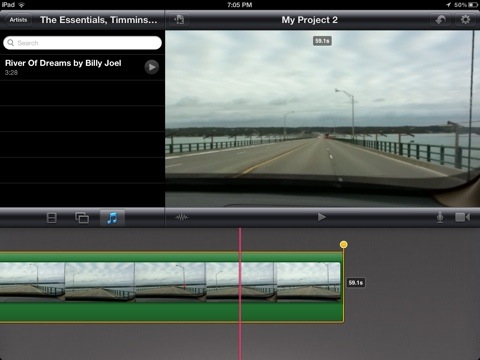
Then, I turned off the loop music function, selected the video clip and two yellow handles appeared. However, only the back handle ( the one on the right) was editable; the handle on the left would not budge. So the music could be re-positioned from the back and not the front? Strange.


I then split the clip where I wanted the music to begin, thinking that if I selected that clip before adding the audio clip, the music would place itself below the beginning of that clip.
No again! The music gabbed the entire video. Well, this was a nightmare!
So off I went to the Apple Store and posed my problem. However, six days later the creative team gave up and sent the problem to Cupertino. Did I find a glitch? Well, sort of.
Not one to give up easily, I continued to play around with the video, exploring every option and this is what I think is a pretty good work around until Apple addresses this issue.
The Fix:
Once again, I split my video in two, but this time, I decided to add the music twice – one to the first clip and the other to the second. But, at first this did not work.
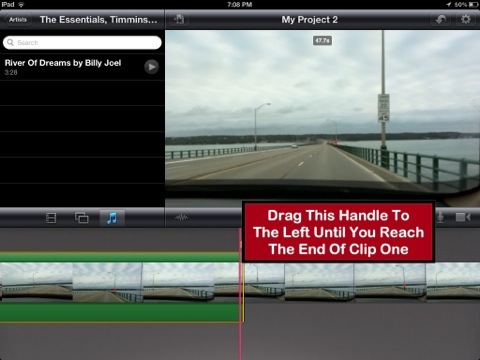
The audio insisted on attaching itself to both video clips, I had to grab the back handle of the audio clip and move it all the way forward to the end of the first clip.

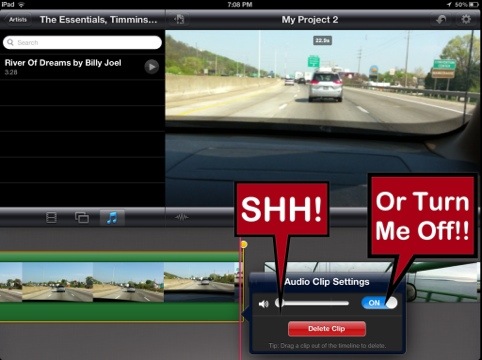
Then, because I didn’t want to hear the audio in this first clip, I double clicked the audio clip to bring up the audio features and turned down the volume all the way to the left. Alternatively, one could also just set the audio to the “off”position. So, although the music was there, one could not hear it.
Now I was left with the second clip minus the audio. Because this is where I wanted the music to originally start, would adding the audio a second time ignore the first clip with the silent audio track and jump to the second? One way to find out! Just do it!

I selected my song from the ITunes library and, wonder of wonders, it grabbed the beginning of the second clip. Praise the Lord, Hallelujah! Then I adjusted the audio level for the music on the second clip, making sure that the music was at an appropriate audio level to compliment the people speaking in the video.
And, that was that! Looking at the written word, it all seems so simple and usually these problems are. However, it took a while to get past what I could easily do on my Mac where one can just move the audio to the correct placement.
Hopefully, Apple will issue an update to address this technical issue in the IMovie App. If one can shorten the video from the back end, one should be able to move the front end to any point in the movie. It should just work, right?
To IPad Or Not To IPad: That Is The Question

It’s official! I love me some Apple.
However, when the new IPad was released a couple of weeks ago, I was among the many that said: “Huh”?
But, like so many others, I didn’t get the BIG picture. Sure it had a snazzy new HD interface and a stronger battery life coupled with LTE lightning speed, but could it sing and dance and do new tricks for me? This is the issue up for tiresome debate all over the Internet.
What it does do, however, is leave its competition in the dust as evidenced by this great article from IDownloadBlog.Com.
This was an IPad that said to all other forms of tablets out there: “Now this is what a tablet should look like. This is technology at its best”.
And the marketing genius behind this new IPad release was undeniable. When Apple decided to add the IPad 2 into the mix with a new and competitive price, the IPad release process grew to blistering heights. I never saw this coming – did you?
In other words, the doors just sprung open for the thousands upon thousands of consumers who could not yet afford an IPad and were, instead, turning to Android or the Kindle Fire. Now, here was an IPad that smoked the other tablets on the market AND at affordable prices. I can do this! Yes, I can!
And so many did! While browsing through the Apple Store, I noticed customers leaving the store with an armful of IPad 2s, along with the new IPad. It was pretty funny to watch. At the new, competitive price, the IPad 2 is a great buy and is an excellent choice for gift-giving.
However, in the end, the new IPad is still the leader of the pack. Although not noticeable at first glance, the display between it and the IPad 2 look similar. But, placed side by side, the clarity and detail of the Retina Display on the new IPad is absolutely gorgeous.
I always thought that technology was moving a wee bit too fast and am glad that Apple has chosen to relax the reins a bit. In the end, there will be fewer errors and technical issues, as evidenced by the still frustrating new release of Apple TV 3G and its ridiculous load times for movie rentals. But, this is another article for later discussion.
And, yes, the new IPad does feel warm – at times – but, hello, it is a machine and they do heat up.
And, hello,again, if you are using your IPad out in the sun, then by default it will feel warmer.
I just refuse to believe all the hype surrounding this heat issue. I am sure it has been perpetrated by non-Apple enthusiasts who want something to pick at! I don’t think you have to worry about making a trip to the burn unit at your local hospital any time soon.
If you want further proof, read this article from CultOfMac.Com. It reinforces the ridiculousness of the “heat” debate.
In the end, it is up to the developers to take full advantage of the Retina Display and LTE – this opens up a window of discovery and fascination in App Development, enticing consumers to take full advantage of their favorite apps. The IPad is only limited by your imagination – the apps are key to making this new version a creative gold mine.
The IPhoto App is proof of this. It is amazingly intuitive and so easy to use. It truly enhances the world of digital photography. Another revolutionary step for Apple Inc.
Do yourself a favor and purchase this new IPad. Or the IPad 2. Whatever suits your budget. Myself, I want to be at the forefront of technology. I am much older than many geeks, so It’s all or nothing once you become a golden geek.
Are you enjoying your new IPad? Share your thoughts in the comments section.
An IPad In The Right Hands Can Save Your Life

This is why you should always carry your IPad with you. It is literally becoming a way of life.
According to this article from Tuaw.Com, quick thinking Mayo Clinic doctors used an IPad on the spot to assess a patient’s cardiac event.
Here is what Tuaw.Com had to say:
As reported in the Post-Bulletin newspaper, 48-year-old Andy McMonigle was working out with his cycling club at the clinic’s Dan Abraham Healthy Living Center when he began to feel intense pressure in his arm. McMonigle has a history of heart trouble, so he immediately went to the locker room and asked a man for help. That man was Mayo Clinic internal medicine resident Dr. Daniel Leuders, who stayed by the side of McMonigle and yelled loudly for assistance.
Two other Mayo residents (brothers Daniel and Christopher DeSimone) were literally just around the corner, so when they arrived Leuders reached into his backpack and pulled out his iPad. Within seconds, Leuders was connected to the Mayo’s electronic medical record system, where he was able to pull up McMonigle’s medical history.
The history showed that McMonigle had a heart stent installed after a previous heart attack four years ago, which made the physicians suspect that he was suffering from a blockage in the stent. When an ambulance crew arrived, Leuders and the other physicians held the iPad record of McMonigle’s previous EKG alongside the strip chart that was being printed in real time. What they saw further confirmed their suspicions about the blockage.
The physicians made a choice based on the EKG records that probably saved McMonigle’s life. Rather than wait upwards of three hours to run a blood test to verify the clotting, the doctors rushed McMonigle to the cardiac catheterization lab where a team (alerted by activating an emergency code) was waiting. They removed the clot from his artery, which was about 90 percent blocked.
Within three days, McMonigle was released from the hospital and after four more days, he was working out again at the Healthy Living Center.
This is an amazing story. It truly accentuates the fact that owning and carrying an IPad on a daily basis will become a way of life for all. It’s only a matter of time and vision.
Mastered For ITunes: Arts And Technology Just Moved One Step Closer

Pinch me! I am still here, right? Is this the best news since sliced bread?
A couple of days ago, Apple quietly (they’ve been doing that a lot lately) released an exciting advancement for digital music – Mastered For ITunes.
Over time, I have recorded three CDs and, each time, I was relegated to sitting behind the recording engineer while he tried to decipher exactly what I was looking for in my recorded music.
How I wanted to snatch the controls away from him! And, in a moment of weakness and frustration, he relented and let me do my thing at the control panel. But, truth be told, I was itching to leap over the hurdles and just take over the whole project.
Yet overall, after hooking up with an excellent mastering engineer, the final product was quite good even though the music still did not sound fully refined. The original recording equipment was not state of the art, so the mastering engineer had to work within its limitations.
And the digital experience didn’t help matters. The digital music product sounded very compressed (which, in fact it was), tinny and lacked the dynamic strength and sparkle of the original master.
Enter Mastered For ITunes.
Thanks to Apple’s relentless vision for excellence, now everyone’s future recorded products will be a true reflection of their personal vision. In other words, with Apple’s help, one will truly be master of their musical domain. ( had to grab this Seinfeld goodie before someone else thought of it)
Now I just need to find the time to upload some recorded product via Mastered For iTunes. Presently, I am immersed in IBooks Author, working on my first interactive book. But, since I will be in the vicinity of an Apple store very soon, I hope to get OneToOne assistance with both IBooks Author and Mastered For ITunes.
There is a great article from AllThingsDigital.Com that highlights legendary singer-songwriter Neil Young’s frustration at the quality of today’s digital music.
I came across this article via The New York Times, which succinctly summarized the higher level of quality that Apple is bringing to digital music via Mastered For ITunes.
There is also more detailed information about Mastered For ITunes at PCMag.Com and Tuaw.Com.
The Mastered For ITunes guidelines are a long but necessary read, almost fascinating actually if you like this kind of stuff. I wiled away most of my Saturday afternoon just trying to figure out all the terminology. Keep the ‘ole brain going, right?
I won’t pretend to understand every little detail but I do understand the bottom line. Digital music will now reflect the original master, as long as the mastering engineer works within Apple’s framework for excellence. How exciting is that?
I smell another Grammy for Apple. Do you?


 GrannieTheGeek.Com