Category Archives: Technology
Creating Memorable, Frame-Worthy Photos On The IPad Or IPhone

I love printing pictures of family members and then framing them for all to see and enjoy. It has become a full-time passion for me.
I am sure many of you enjoy it as well. So, I decided to share some tips on making what I think are spectacular pictures to hang on your wall.

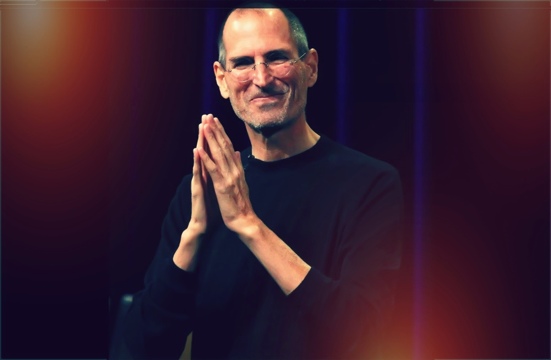
Also, I decided to use a picture of Steve Jobs to demonstrate my work. I am a stickler for privacy here, so my personal pictures, unfortunately, are inaccessible for mainstream internet.
First of all, if you don’t have all your best photos on your IPhone or IPad, it is best to transfer them from your computer to the Photo App on your chosen device.
There are many ways to do so and ICloud has made this very easy. However, for those of you who do not have ICloud and/or want to use less current pictures, there is a wonderful App out there called PhotoSync
I first learned of PhotoSync from my friends at IPhoneInCanada.Ca. It has been a lifesaver for me, seamlessly and wirelessly transferring photos and videos between computers and devices.
And as a bonus, the PhotoSync Companion is available for Windows or Mac OS X
Plus, it comes packed with features aplenty.
The Mobile Apps are also quick and easy to install on your IPad or IPhone.
Then, once the transfer process is complete, you can further refine your photos before you add additional enhancements.

So, I always access a solid image editing tool like Photoshop Express for IPhone or IPad. It has the basic but all-important tool refinements like, noise reduction, sharpening, exposure, contrast, crop, rotate.
I am big on Noise Reduction. It is a thorough cleanser for the majority of pictures, adding a smooth, flawless texture. And the cropping feature is an important element as well. I used both on the Steve Jobs photo, pictured above.
Then, if you want to get down and funky, download the Camera+ App for IPhone. Unfortunately, there isn’t an IPad App for this photo imaging tool, but the IPhone version is just as efficient on the IPad.
You can achieve some really neat looks with the various options available via this neat image editor. I just love it. But be forewarned-it is terribly addicting.
For the Steve Jobs picture, I used the Diana effect with 84% intensity. But, there were many, many choices within this wonderful App. Just you wait!
And, save many different versions of the same picture. You’ll be glad you did. Depending on the color of your chosen frame, one version of an edited picture may work better than others.
Following this, the fun truly begins. There is a wonderful framing App out there call Imikimi for IPhone and IPad. Once downloaded, you will be treated to vast array of categories to suit every mood or event.
I can’t stress enough how exceptional this App is-it is the closest thing I have seen to digital scrapbooking.

You simply select a photo from your photo library and add it to the empty square box in the frame. Once you do so, you have more options at your disposal to position or enhance the picture.

I often save many different versions within the Imikimi App so I don’t clutter up my Photo App, but you can easily save all your framing projects to the Photo App on your IPad or IPhone.
If there is one drawback to Imikimi, it is the fact that the vast majority of the frames are sized for a square photo, as opposed to a 4×6 or 5×7 etc. Up in my neck of the woods, I found fairly reasonable frames at Michaels, but, depending where you live, you may have more options for purchasing these frames.
And the square formation is perfect for scrapbooking. It is totally your call.
Once you are done, you merely have to print out your picture, using premium photo paper of course.
Let the ink dry overnight, pop it into the frame or scrapbook and you are done. Except for the squeals of delight on the faces of family members and friends once they see your digital work!
Happy Framing! Happy Scrapbooking! And please leave your ideas and thoughts in the comments section.
The Apple Stores: A Playground For The Apple Geeks And So Much More
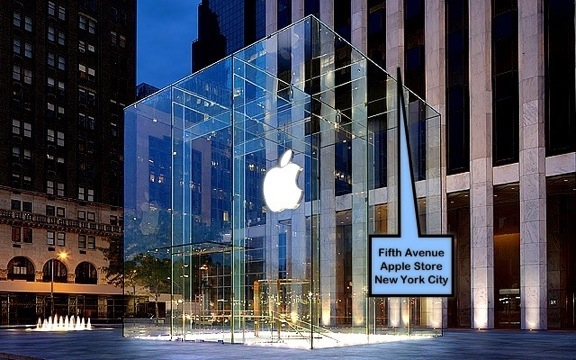
What a vision Steve Job had when he created The Apple Stores!
His child-like sense of wonder led him to believe that these stores would be a phenomenal branding tool for Apple. Even though business experts and the Apple Board were blatantly skeptical of their success, Steve Jobs remained undaunted and forged ahead.
Through his detailed and innovative design, Steve Jobs created a playground for Apple enthusiasts around the world, a place where one could learn, interact, develop, work, shop or just chill with people who shared the same enthusiasm about Apple Products.
Article: Former Apple Store Chief: No One Came To Genius Bars In Early Years
I don’t live anywhere near an Apple Store. It’s very sad here! However, the first store I visit when traveling to a major center in the USA or Canada is The Apple Store.
Clothes are not a priority for me. Gadgets are, specifically Apple gadgets and devices.
Yes, I am a senior citizen but, with the time I have left here on Earth, I want to fully embrace the advances in technology. It is important to me and it energizes me knowing that I am living at a time when the innovation process is so alive and prolific.
But even more important, I want to enjoy the looks on my grandchildren’s faces when I show them the newest IPad/IPhone/Apple TV and in a couple of years, Apple’s rumored Television
Steve Jobs’ playful yet passionate nature has allowed people of all ages to take full advantage of his creations.
I sometimes get frustrated when people my age say they don’t understand “computer stuff”. They don’t realize that Apple has created products so that the “computer stuff” is less intimidating. It is fun, creative, colorful, imaginative. It takes you to places you could never have imagined.
And there is no better place to realize this fact than to experience the jubilant and helpful atmosphere of The Apple Store. The Apple employees have received rigorous training and are ready and willing to take you on an Apple adventure.
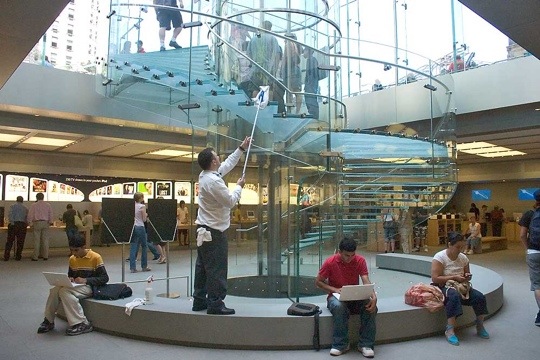
Like it’s founder, Steve Jobs, they are not there to earn a fast buck nor do they pressure you to buy, Buy, BUY! The employees work without commission and are ingrained with a highly defined passion and work ethic.
I have met the most wonderful people in Apple Stores – both employees and customers. The enthusiasm that permeates this signature Apple environment is contagious. Like being at a playground.
Have you had exceptional experiences in an Apple Store? Please share them with us via the comments section. Videos accepted.
Steve Jobs Cried Lots Of Rivers In His Quest For Perfection

Perfection comes at a high price. Steve Jobs learned this. Walt Disney learned this.
In fact, some of the most brilliant minds throughout history made enormous sacrifices to innovate products that would change the course of history.
And most died relatively early in their tumultuous, yet legendary creative careers.
According to Steve Jobs’ authorized biography by Walter Isaacson, the late co-founder of Apple Inc. was extremely, extremely emotional when things did not go his way.
However, his tearful episodes seemed to occur when he sensed he was losing control of the reins.
His tears were those of frustration – frustration that people could not envision what he could or that those around him would not push themselves to achieve absolute perfection in their design projects.
For Steve Jobs was the epitome of a control freak and, while driven by demons and, at times, a lack of personal identity, he felt that the only way to make a difference was to obsess over the finest of details.
Excellence, after all, is in the details and Steve Jobs was the personification of this very fact.
And, to that end, it did pay off. Apple became an overwhelming success because of his obsessive attention to detail combined with his magical thought process.
However, the price he paid was extremely high. His health faltered and often times became a nagging inconvenience in his life.
Apple became his focus and, because of this, he literally sacrificed his life so that we could become the joyous recipients of his creations and he, a legend to be remembered throughout time.
His authorized auto-biography by Walter Isaacson was a long but necessary read. At times, it was heart-wrenching. I became physically exhausted by mentally going through the paces that Steve Jobs set for himself.

Yet, to his absolute credit, he never forsake his family. Yes, there were some incidents when he was younger and more rebellious, but, in his heart, his family remained foremost in his mind. Especially in the final stages of his life.
Will we ever see another like him in our lifetime? Not likely. There is only one Steve Jobs.
But, I am hoping that his journey to create a technological empire against insurmountable odds will provide encouragement and inspiration to a new breed of developers.
As Steve Jobs himself said during his Stanford University speech, our time here is limited. Truer words were never spoken.
No one really knows or can fully appreciate the opportunities awaiting us, so it is important not to day-dream one’s life away.
As the song, featured below, goes, when times are tough, you must “pick yourself up, dust yourself off and start all over again.”. I know – it’s a bit of a cheesy message but the words ring true.
And, during the rocky years, Steve Jobs certainly did not waste time feeling sorry for himself. He continued to move forward.
Were you inspired by Steve Jobs autobiography? Are you traveling his road or hope to do so? Drop by the comments section and share.
A Charlie Brown Christmas For The iPad/IPhone/IPod Touch Takes You On a Magical Journey

A couple of nights ago, I was feeling the Christmas spirit and decided to spend $6.99 for the A Charlie Brown Christmas IPad App.
And a better way to blow seven bucks I have yet to encounter!
This classic Charlie Brown tale magically comes alive via the wonders of Apple technology and Loud Crow Interactive.
It is a brilliantly conceived interactive book, resplendent with animated features and personal involvement.
Produced by Loud Crow Interactive, creators of PopOut! The Tale Of Peter Rabbit and PopOut! The Night Before Christmas, this Charlie Brown classic takes on a beautiful and meaningful experience when viewed on the IPad.

It is also available for the IPhone and IPod Touch but, truth be told, one will more fully appreciate this interactive storybook when viewed on a larger screen.
And, for all the non-Apple consumers, this storybook is also available on Android and Amazon devices.
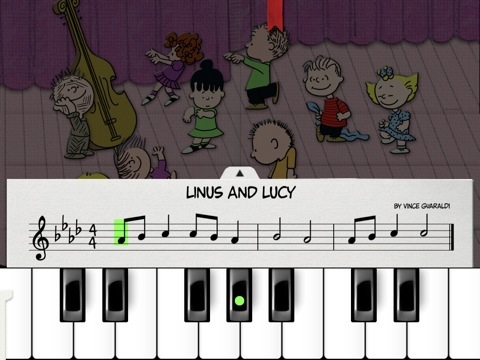
We all grew up with this storybook and now you can share this seasonal tale with your children and grandchildren in a new and meaningful way.
This book offers so much: one can play Schroeder’s piano, finger paint with the gang, go carolling with the Peanuts choir, and participate in the Spectacular Super-Colossal Neighborhood Christmas Lights and Display Contest to unlock decorations for your very own Charlie Brown Christmas Tree!
Check out the trailer below and empty that spare change in your pocket to purchase this book. You will immediately be thankful that you did! And your children will enjoy many hours reveling in the glow of this beautiful story.
A Halloween Treat For Techno Geeks

Are you watching scary movies now or stuffing Halloween grab bags for the kiddies?
Well, take a break and enjoy this animated spectacular from KJ92058 on YouTube.Com.
This video has already received well over four million hits on YouTube. Amazing stuff!
I always marvel at the creative genius that exists among us. It really makes the world an exciting place in which to live.
Enjoy the Halloween Electric Light Show below. And, if you have links to other Halloween spectacles, please visit the comments and add your links.
Happy Halloween everyone!


 GrannieTheGeek.Com