Category Archives: Apple Products
Happy 57th Birthday Steve Jobs. You Are Missed!

Heaven has inherited a tech angel in the form of Steven Paul Jobs. I am sure that my deceased father, who loves gadgets and from whom I inherited this love, is having a grand ‘ole time watching Steve weave his magic in his new home – the spiritual ICloud.
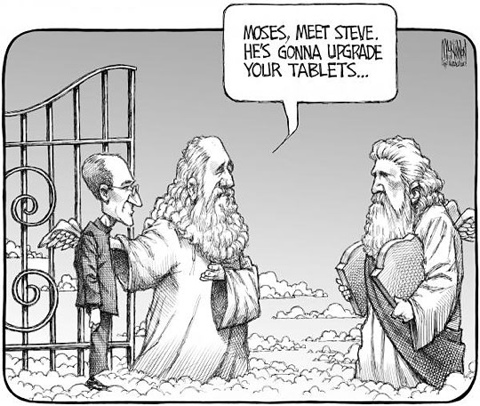
But, here on earth, we are celebrating what would have been Steve Jobs’ 57th birthday. And, even though he is no longer with us in body, his spirit is an everlasting presence each and every day of our lives. Well, certainly my life.
For instance, I am typing this article on the IPad, while receiving text messages via my IPhone. My Mac is booted up and ready to use each day, seamlessly supported by Time Machine via Time Capsule back-ups.
And later on this evening, I will fire up my Apple TV to watch a movie and to access AirPlay in order to view the latest videos of my grandchildren.
Earlier in the day, I entertained my 1-year-old grandson with both my IPhone and IPad – stories, music, games in the form of Children’s Apps are the norm around here.
And, like many babies and toddlers out there, he has already mastered the art of pinching and swiping.

This blog and so many like it exist because of Steve Jobs’ passion for technology and the arts. I am a musician and it was through the Apple experience that I was able to fully embrace all that technology could offer in terms of creative possibilities.
GarageBand, IMovie, IBooks Author, IPhoto Calendars and Books, not mention all the media and photo apps available – all spoke to my innate desire to create, create, create!

The passion for creativity is ageless and Steve Jobs understood all this from day one. From young children to young children at heart, the Apple experience was created for people who never wanted to grow up. We have a bit of this Peter Pan complex in all of us, but, for some of us, it really is a way of life.
Unfortunately, I came late to the Apple party – June 2009. I walked into the local Future Shop, fell in love with the IMac 24″, bought the last one – a floor model but brand new – and never looked back.
In closing, I would like to express my heartfelt thoughts and prayers to his wife Laurene, his children, his colleagues – everyone who was influenced by this extraordinary man.
And – one more thing – please take the time to leave a message on the website created for Steve Jobs’ birthday.
Move Over Lion. There’s A New Kittie Cat On The Block And It Is Huge.
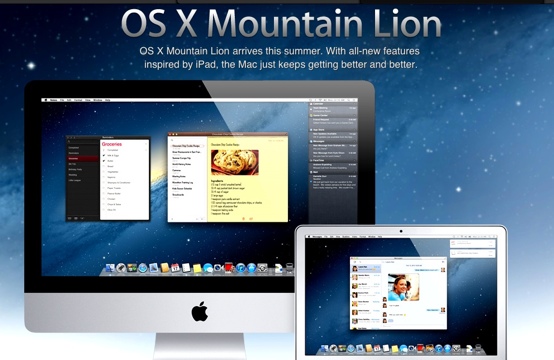
Apple is moving fast and furious with their updates and news releases. First it was IBooks Textbooks For The IPad, IBooks Author, then the leaking news about the imminent release of the IPad 3 and now, yet another update for the Mac.
Introducing OS X Mountain Lion – the successor to Lion OS X. And, it looks like this Mac App only update, scheduled to be released in late summer, is going to fill Lion’s shoes – or paws, so to speak, very nicely.
Everyone is giddy with excitement, as this update will be a true reflection of everything that is now possible on the IPad. Except, now you can sit at your Mac, texting and tweeting the hours away as you work on your Mac projects.
Here are some of the highlights of Mountain Lion, from the pages of Mashable.Com:
And Mac OS X has had to throw out some of its stuff. Bouncing icons in the dock? Who needs them when you’ve got Notifications, which appear in classy banners down the side of the screen? The venerable antique Instant Message software, iChat, a 2002 vintage? A stupid wagon-wheel coffee table, says iOS. Throw it out.
Instead, here’s iMessage, which will still let you IM your contacts (if you must). But what it really wants you to do is use Apple’s seamless texting replacement of the same name. Admittedly, the thought of being able to immediately text anyone with an iPhone for free from your desktop is so unbelievably cool, it can bring on an attack of the vapors.
You get the sense the Mac is going to be happy with its new roommate. What’s not to like about Airplay, which can seamlessly mirror your desktop on an HDTV? Or a separate Notes app, where you can attach notes to the desktop like stickies? Or Game Center, which will mean a lot more cross-device play?
Or a “share sheet,” which effectively means developers are going to be able to put Twitter buttons everywhere? Mountain Lion will already let you tweet from all standard OS X apps such as Safari and Photo Booth. That means you can sit and take photos of yourself and instantly tweet them, to your heart’s content. It’s a boon for Twitter users (Twitter readers, not so much).
.
And, of course, everything will be seamlessly synchronized with your mobile devices via ICloud. So, for example, if you are working on a Pages document on the Mac, your work will be stored in the cloud for future access on another device. Or vice versa. The possibilities are endless.
Technology is a very good thing. And Apple technology is even more exciting, healthy even. You know, “An Apple (product) a day keeps the doctor away”. And, when you are a senior citizen, this motto makes even more sense and resonates to a higher degree.
So, if you haven’t upgraded to Lion, does this bit of news entice you to do so? I finally caved in January and, at the time, wondered what took me so long? It went without a hitch.
My only concern: isn’t Apple going to run out of cat names soon? Cheers!
Airport Utility and Time Machine 7.6.1 Nightmare Morphs Into Sweet Dreams

It’s official. You can’t geek and babysit grandchildren at the same time.
All was fine with my Time Machine/Time Capsule set-up – until Airport Utility’s 7.6.1 update. Then, it malfunctioned, leaving me in a state of digital confusion. What to do? What. To. Do?
Update: I also updated Time Capsule’s firmware to 7.6.1.
Plus, I was in grandmother mode here and really couldn’t multi-task with a toddler running around the house.
So, this was the problem. After I updated Airport Utility and Time Capsule, the annoying amber light on my Time Capsule started to flash and flash. What the…?
Plus, my grandson was vying for my attention, So, basically, all hell was breaking lose in my house.
So, I forged on. I had some supper (at least I think I did) and, later that evening, I strolled to the Apple support forums, already rampant with geeks who were experiencing the same problem. The popular suggestion was obvious – simply reset the Time Capsule.
So, after a couple of reset attempts, I did get the Time Capsule up and running, smoothly backing up my data via Time Machine.
However, this time around, I configured the Time Capsule to act as an extension of my regular wireless network. Previous to this, I was using it solely for Time Machine back-ups.
So, something was wrong – the amber light was still flashing! Honestly. When would this end?
I toyed with the idea of calling in a tech person but the idea of someone else in my house after a marathon few days of babysitting one of my grandsons was too much to bear. Plus I didn’t need a patronizing look from a tech coming to rescue a senior citizen in distress. Plus plus – I needed something to blog about!
So, for extra precaution, I hooked up the Time Capsule to my server’s router – just to cover all the bases, so to speak.
Previous to this, it was performing exceptionally well via my wi-fi, but I wanted the security of a wired set-up until I figured out the reason for the flashing amber light.
However, upon doing this, I was receiving messages via Airport Utility that I was not connected to the Internet, didn’t have a valid IP etc., yet, at the same time, all was running smoothly in terms of my Internet and Time Machine back-ups.
So, I detached the Ethernet from my Time Machine(I don’t know why. I just did.), i think, at the time, I thought it was plugged into the wrong slot on the back of Time Machine. Who knows? I was grasping at straws here.
I then plugged it back in and, when I checked Airport Utility this time, I received an error message that frantically had me searching the help menu in Airport Utility. Apparently, my Time Capsule needed to be configured for bridge mode. What’s bridge mode? Time to find out!
I strolled over to the Apple Support Forums to see if this bridge thing was indeed a good thing or not – but not before I checked on the status of my Time Machine back-ups. All was still fine. Good!
Apparently, Time Capsule, when attached to another router, can act as a bridge, if you are not using the Time Capsule as your main base station or router.

So, I care.fu.lly. followed the instructions and activated bridge mode for my Time Capsule and voila! A steady, strong and glowing green light appeared on my Time Capsule! Problem solved!
Now I know why green is my favorite color. It’s the color of nature and money and all good things, the most important being digital harmony.
For the younger geeks this may not have been a biggie, but for little ‘ole senior me, it was. So stop laughing.
In the near future, I will be vacationing in the vicinity of an Apple Store where I know I will be spending a great deal of my time. One is never to old to learn and I want to learn from the best.
I should just camp-out in front of the store. What could go wrong? The Food Court is just upstairs and boasts a Starbucks, so what could be finer?
You know, Apple should just bite the bullet and build iHotels for the truly geeky people in the universe. Or better yet – a retirement home for senior geeks such as myself. Can you imagine? An iHome for golden geeks! One can only dream.
So, anyone else have problems with their Time Machine after the Airport Utility update? Did I miss something? Share your thoughts in the comments section.

I Downloaded Lion To My IMac And Lived To Tell About It

So, okay, that was easy. After months of trepidation, I finally took the plunge and downloaded Lion OS X. All that hemming and hawing and scare tactics from other Mac users that Lion was going to destroy my Mac were in vain. The Lion update downloaded and installed seamlessly.
Now, mind you, it did take time. The update takes up 3.97 Gigs on your Mac – that is pretty huge, so one has to set aside 5-6 hours to complete the entire process. Perhaps less if you have a strong wireless connection.
But, when all was said and done and the computer went through the restart phase to seal the deal, I was greeted with the face of a Lion accompanying my login information. And, guess what? The beastly critter didn’t bite at all.
All my files, media and applications were visibly intact and, quite frankly, I found that my 24″ IMac was operating smoother. And quicker!
Now, I know you’re wondering what motivated me to take the plunge after all these months. And, even if you don’t care, I’ll tell you anyway.

It was the newly-released Mac App, IBooks Author, that prompted me to take the leap. I have been waiting for a program like this forever and a day. The ability to design your own interactive e-book intrigued me and I needed the Lion upgrade to grab the free App from the MacApp store.
More about this at another time – I hope to review this cool App very soon.
Going back to Lion – a few words of caution. There is a great deal of documentation out there regarding how to prepare your computer for the upgrade. You have to sift through the plethora of information to filter out right from wrong.
Over the past few months, I have been reading many articles – some excellent, others not so -just to make certain that my computer was ready for the upgrade.
I would advise all of you to do so. I learned a great deal in the process and it made me realize the powerful creativity of Lion and of technology in general.
I have provided links at the end of this article to the very best guides. They should be your tech bible if you want to follow through with the upgrade.
Also, now is the time for you eliminate all the clutter on your computer. If there ever was a perfect time to house clean, this is it.
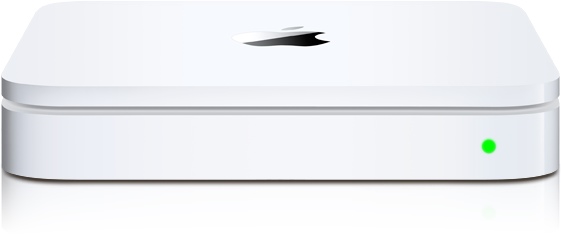
And backup your files and media. My computer uses Time Machine via Apple’s Time Capsule plus a couple of other external drives just to be safe.
Also, it won’t hurt to clone your hard drive. All this may seem like overkill, but it really isn’t. By taking the proper precautions via regular backups and cloning, you will rest assured that your data is safe and protected in the event that your computer fails somewhere down the road.
Now, if Apple would just bandage the gaping wound in their second generation Apple TV unit, I would be in Apple heaven.
As promised, here is a resource list of excellent articles that will transition you through to this next phase. Read them at your leisure, carefully, and don’t be afraid to ask questions or email the author for advice if need be.
Or here’s a thought – leave your comments and questions in the comments section attached to this blog topic.
Have you downloaded Lion already? Was it a success or no?
Upgrade To Lion: Only From The Mac App Store (Apple.Com)
Installation And Recovery (Apple.Com)
Installing Lion: Our Complete Guide (Macworld.Com)
Preparing Your Mac For OS X Lion (Mashable.Com)
OS X Lion: Installation Guide, Boot Discs and Q&A (MacStories.com)
Nine Things You Should Do After Installing OS X Lion (Techcrunch.Com)
Apple Second Generation TV Unit Just Doesn’t Work

For the love of Pete, can someone out there in Apple land fix the trainwreck known as Apple TV 2? It just does not work. Movies download sufficiently well but the problems begin when one wants to watch the rented film.
The movie takes forever to start and, when it does, invents its own commercial breaks by stopping and reloading in mid-scene. My favorite is when, during the last rented movie my husband and I tediously watched, the movie decided to reload approximately five minutes before the ending.
So, Apple people, instead of working on a future release of an Apple HDTV, how about fixing the little black box known as the Apple TV 2 unit first? This product needs to be recalled and/or repaired via an immediate software update.
I think the only thing more maddening about the deficiency of this Apple TV 2 gadget is Apple’s silence at the thousands upon thousands of consumers ranting on their message boards.
Steve Jobs must be rolling in his grave. He was all about consumer satisfaction and communication.
Since he died, the only headlines capturing our attention were the millions of shares shoved into CEO Tim Cook’s pocket. Like we care.
We do not begrudge Apple’s head honchos their financial due, but we do hold them to task when products do not work while the company fails to address the issues.
I am an Apple fan and it will take a cold day in hell before I defect. But remember, all fans are created differently and can be fickle, depending on their tolerance level.
How about you? Is your Apple TV 2 unit going wonky? Did you manage a magical fix? If so, share in the comments section.


 GrannieTheGeek.Com